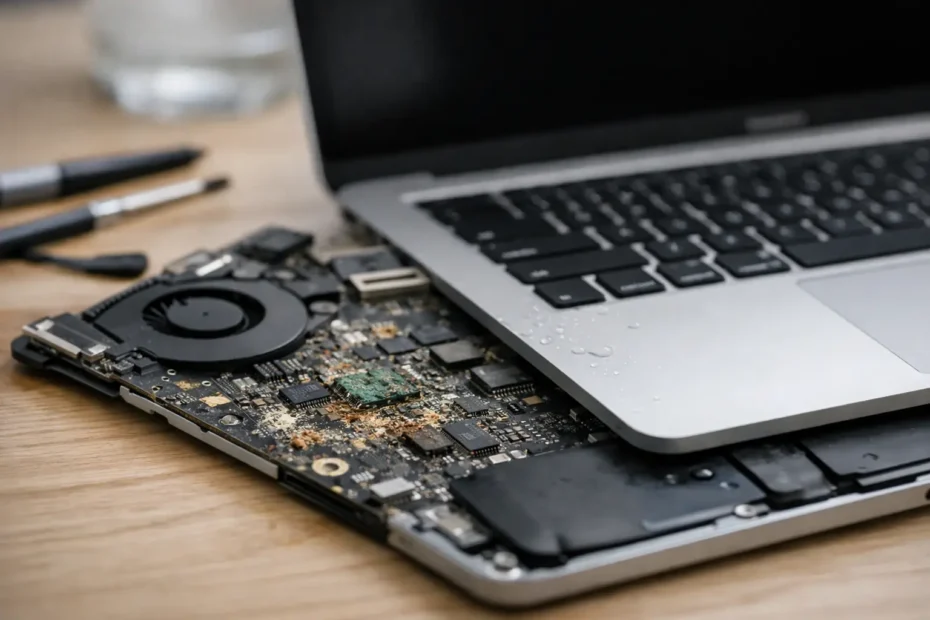
A Mac can look completely normal after a spill, then fail days or weeks later. That delay is exactly what makes the signs of Mac liquid corrosion easy to miss. Water, coffee, soda, and other liquids can travel beneath the keyboard, into connectors, and onto the logic board long before a visible problem appears.
If your Mac was exposed to liquid, the right response is not to wait and see whether it keeps working. Fast, informed action can make a real difference to the repair cost, the condition of the logic board, and the chances of recovering important files.
Signs of Mac Liquid Corrosion to Watch For
Liquid damage does not always cause an immediate no-power failure. In many cases, the Mac turns on, charges, and seems usable at first. Corrosion begins when moisture and contaminants react with the tiny metal components and solder joints inside the computer. That process can continue after the outside of the Mac feels dry.
One common warning sign is inconsistent behavior. Your Mac may boot normally one day and refuse to start the next. It may shut down without warning, restart by itself, freeze during ordinary tasks, or show a question mark folder at startup. These symptoms can also have software causes, but after any liquid exposure, they deserve a hardware inspection.
Charging problems are another red flag. A MacBook may show that it is plugged in but fail to gain battery percentage, charge only at a certain angle, or stop recognizing the charger entirely. On USB-C models, one port may work while another does not. This can point to corrosion around the charging circuit, USB-C board, battery connector, or logic board.
Keyboard and trackpad trouble often appears early because spilled liquid commonly enters through the keyboard. Keys may feel sticky, type the wrong characters, repeat letters, or stop responding. The trackpad may click inconsistently, move on its own, or refuse to register clicks. Replacing a keyboard may solve a localized problem, but it does not automatically address contamination that reached deeper components.
Display symptoms can be misleading. You may see flickering, vertical lines, random color changes, a dim screen, or a backlight that works only sometimes. In other cases, the Mac appears to turn on but the screen stays black. A damaged display is possible, but liquid corrosion on the display connector or logic board can produce the same result.
Other signs include unusual fan activity, speakers that crackle or stay silent, a webcam that disappears, Wi-Fi or Bluetooth that cuts out, and ports that no longer detect accessories. If several unrelated functions fail after a spill, the problem is rarely a simple software setting.
Why a Mac Can Fail After It Seemed Fine
Pure distilled water is less damaging than a sugary drink or coffee with milk, but no spill is harmless inside a computer. Tap water contains minerals. Sports drinks, soda, wine, coffee, and juice leave conductive or sticky residue. Even after the moisture evaporates, that residue can keep attracting humidity and promoting corrosion.
The amount and location of the liquid matter as much as the type. A few drops near a MacBook keyboard may affect only a small area, while a spill near the trackpad, vents, ports, or logic board can reach critical power circuits. Older and newer Mac designs also route internal components differently, so there is no honest way to diagnose the severity from the outside alone.
This is why a Mac that is currently working should not be treated as cleared. Continued use sends power through circuits that may have moisture or contamination present. That can turn a repairable corroded component into a more serious short circuit.
What to Do Immediately After a Spill
First, shut the Mac down. Do not keep typing to finish an email, save a file, or test whether every key works. If the screen is unresponsive, hold the power button until the machine turns off.
Disconnect the charger and every accessory. Do not connect power again just to check whether the battery is low. Charging a liquid-exposed Mac is one of the fastest ways to create additional damage in the charging and power-management circuits.
Gently blot visible liquid with a soft, lint-free cloth. If it is a MacBook, open the lid and position it so liquid can drain away from the keyboard rather than further into the chassis. Avoid shaking it aggressively. Shaking can spread liquid into areas it had not reached.
Do not use rice. Rice does not remove residue, clean corrosion, or dry liquid trapped under shields and connectors. Do not use a hair dryer, oven, or high heat either. Heat can damage displays, batteries, adhesives, and delicate plastic components while leaving the contamination behind.
If the data is valuable, do not attempt repeated power-ons. A professional inspection can determine whether the Mac can be stabilized for data recovery before further testing puts the storage or logic board at risk.
What a Proper Liquid Damage Inspection Looks Like
A meaningful liquid damage diagnosis goes beyond looking for moisture near the charging port. The Mac needs to be opened and inspected for residue, corrosion, damaged connectors, and affected circuits. On many models, the most serious corrosion is hidden beneath the logic board, shields, keyboard assembly, or connectors.
The repair approach depends on what is found. Sometimes the best outcome is careful internal cleaning and replacement of a damaged keyboard, trackpad, battery, or USB-C board. In more serious cases, component-level logic board repair may be needed to restore a power rail, backlight circuit, charging circuit, or data-related function.
There is a trade-off worth understanding: cleaning alone may be appropriate when contamination is caught early, but it cannot restore components that have already failed. Conversely, replacing an entire logic board can be expensive and may not be necessary when a specialist can isolate and repair the actual damaged area. An honest diagnosis should explain what was found, what repair is recommended, and what risks remain.
When Your Files Are the Priority
For many Mac owners, the computer is replaceable but the files are not. Client projects, family photos, tax records, audio sessions, school work, and business data can be far more valuable than the hardware.
Modern Macs often store data on soldered storage chips or integrate storage security with the original logic board. That means removing an SSD is not always an option, especially on newer MacBooks. If liquid corrosion affects a Mac that will not start, repairing the original logic board enough to access the data may be the practical path to recovery.
Tell the technician early if data is your first priority. The testing strategy may be different when the goal is to preserve the best chance of accessing files rather than simply determining whether the Mac can be economically returned to daily use.
When to Bring It In
Bring the Mac in promptly if it had direct liquid exposure, even if it seems normal. You should also seek help immediately if it will not power on, gets unusually hot, smells burnt, will not charge, shows a black screen, or begins having multiple unrelated hardware issues after a spill.
For Mac owners in Central Florida, YourMac.Repair provides direct access to Eduardo for transparent liquid damage diagnosis and advanced component-level repair. That matters when a Mac has been labeled beyond repair or when preserving data from the original logic board is the goal.
A spill does not automatically mean your Mac is finished. What matters is what liquid reached, how long it remained inside, and whether the machine was powered or charged afterward. Turning it off and getting a proper inspection quickly gives you the best chance of saving both the Mac and the work stored on it.
Need Mac or iPhone repair in Winter Garden / Orlando?
YourMac.Repair — board-level Apple repair with honest diagnosis and fast turnaround. We say YES when Apple says NO.
- Mac Logic Board Repair — liquid damage specialist
- Mac Screen Repair
- Mac Battery Replacement
- Mac & PC Data Recovery
- iPhone Screen Repair — same-day service
📞 (407) 580-9965 · WhatsApp · 819 Marsh Reed Dr, Winter Garden, FL 34787