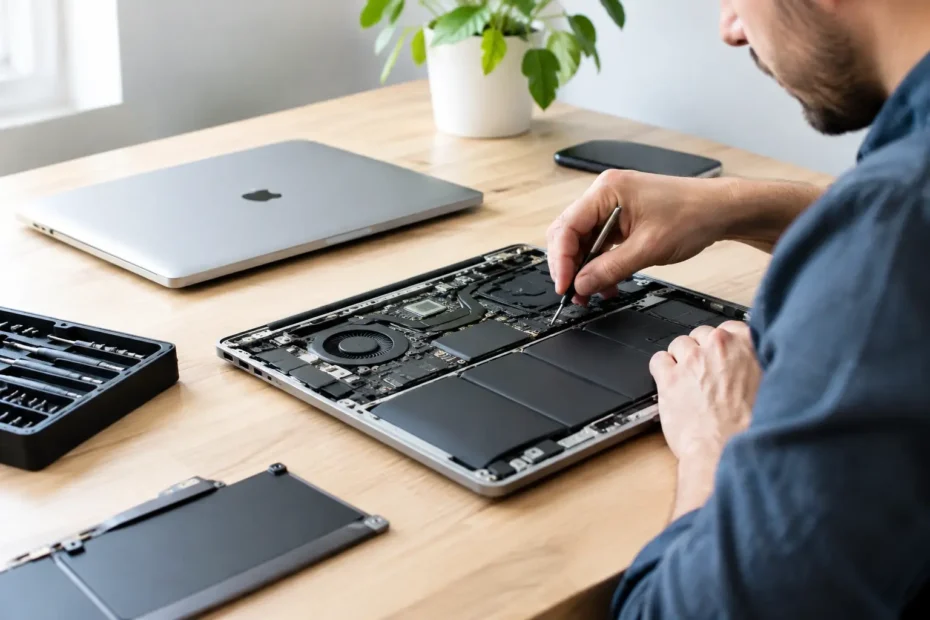
A Mac that will not turn on can look like an expensive lost cause. But the same symptom can come from a failed charging component, a damaged USB-C port, a bad battery, or a logic board fault. That is why Mac repair cost factors are not as simple as finding one price online. A proper estimate starts with identifying the actual failure, not guessing based on the symptom.
For professionals, students, creatives, and small businesses, the question is usually bigger than “What will this cost?” It is also, “Can I keep my files, avoid replacing a good computer, and get back to work quickly?” The answers depend on the model, the damage, the available repair options, and the quality of the diagnosis.
The Diagnosis Determines Whether the Price Is Fair
A clear diagnosis is the foundation of any honest repair quote. A MacBook with no power may need a battery replacement, but it may also have a shorted component on the logic board. Replacing the battery without testing the power rails, charging circuit, and board condition can waste both time and money.
This is where repair methods matter. Some shops quote only for full assemblies because that is the only type of repair they offer. If the logic board is affected, the proposed solution may be a costly board replacement or a recommendation to buy a new Mac. A specialist capable of component-level diagnostics and micro-soldering can sometimes repair the failed circuit instead. That can make a major difference in price, especially when the rest of the machine is in good condition.
A diagnostic process should explain what failed, what repair is recommended, and whether there are reasonable alternatives. The lowest initial quote is not always the best value if it is based on an assumption rather than a confirmed fault.
Mac Repair Cost Factors by Device and Model
The exact Mac model affects part pricing, labor time, and repairability. Older MacBook Pros may use separate components that can be replaced individually. Newer models often have tightly integrated designs, where the keyboard, battery, trackpad, and top case may be part of one assembly. That can raise the cost of certain repairs even when only one component has failed.
Screen repairs are a good example. A cracked display on one MacBook Air may require a complete display assembly, while another model may have a different part cost or availability. Retina displays, True Tone support, size, year, and the presence of a webcam or backlight issue all influence the estimate.
Desktop Macs have their own variables. An iMac screen must be carefully removed and resealed to access internal components. A Mac mini or Mac Studio may be easier to open for some service work, but logic board issues, power faults, or storage problems can still require advanced testing. The model identifier and year help determine what is practical before any work begins.
Part Availability and Part Quality
Not every replacement part is equal. A lower-priced battery or display may be attractive, but quality, compatibility, and reliability should be part of the conversation. In some cases, a premium replacement part is worth the added cost because it restores expected performance and reduces the chance of another repair soon after.
Availability also matters. A common battery may be readily available, while a specific display assembly or older logic board component may need to be sourced. That can affect both the final price and turnaround time. A trustworthy repair shop should be upfront about whether a part is new, used, refurbished, or aftermarket when that distinction applies.
The Type and Extent of Damage Matter
Physical damage is often straightforward at first glance: a cracked screen, bent enclosure, broken key, or damaged charging port. The cost changes when that damage reaches more than one component. A drop that breaks the display may also damage the display cable, hinge area, or logic board. A damaged USB-C port can affect the surrounding circuitry.
Liquid damage is even less predictable. Coffee, water, soda, and other spills do not behave the same way inside a Mac. The amount of liquid, where it entered, how long the device remained powered, and whether corrosion has begun all affect the repair path.
A spill may only require cleaning and a minor component repair. In other cases, corrosion can damage multiple circuits or travel beneath chips on the logic board. Fast professional treatment improves the odds, but no honest technician should promise an exact outcome before the machine is inspected. The priority is usually to stop further damage, assess the board, and protect the customer’s data where possible.
Data Recovery Can Change the Repair Decision
When a Mac will not boot, the repair cost is not the only number that matters. The value of the files may be much higher than the value of the computer. Client projects, family photos, financial records, design files, and business documents can make data recovery the most important part of the job.
On many newer Macs, storage is integrated into the logic board. If the board fails, moving the drive to another computer is not an option. Repairing the original board may be the best route to recovering the data. That requires a different level of expertise than a standard parts swap, and the scope of work may be greater.
Before approving a repair, be clear about your priorities. Do you need the Mac working again, do you primarily need the files, or do you need both? Those goals can affect the recommended approach and budget. It is also wise to avoid repeated power-on attempts after liquid exposure or an unexplained no-power failure, as that can sometimes worsen the damage.
Labor Reflects the Difficulty, Not Just the Part
A battery replacement and a logic board repair can both involve opening a Mac, but the work is not comparable. Some batteries are secured with strong adhesive and require careful removal to avoid damaging nearby components. Keyboard repairs may involve a full top-case replacement. Display repairs require precise handling, testing, and calibration checks.
Board-level work takes additional time because the technician must locate the failed component, test surrounding circuits, perform the repair, and verify stable operation. A repair that restores charging, backlight, Wi-Fi, or power may involve a very small component, but the diagnostic skill behind it is substantial.
Labor is also influenced by access. A Mac with prior repair attempts, stripped screws, missing shields, or poorly installed parts can take longer to service safely. The repair should account for the condition of the device as it arrives, not just the original problem.
Age, Condition, and Remaining Useful Life
A repair is not automatically a good investment just because it is possible. The fair question is whether the Mac will meet your needs after the repair. A machine with a healthy screen, enclosure, keyboard, battery, and adequate storage may be worth saving after a board repair. An older Mac with several major issues may be better suited to a targeted repair, data recovery, or replacement plan.
Age alone should not decide the issue. A well-maintained older Mac can remain useful for email, schoolwork, office tasks, music production, or business operations. In some cases, an SSD upgrade, internal cleaning, thermal compound replacement, or supported macOS upgrade can extend its practical life at a far lower cost than a new computer.
The key is to evaluate the whole machine. A good repair recommendation considers performance needs, software compatibility, battery health, future reliability, and the customer’s budget.
Questions to Ask Before You Approve a Repair
A written estimate should be easy to understand. Ask whether the issue has been confirmed, what parts are included, whether data preservation is a priority, and what testing will be completed before the Mac is returned. If there are multiple paths, such as a board-level repair versus a full assembly replacement, ask for both options and the trade-offs.
Also ask what happens if additional damage is found. Complex liquid damage and board faults can reveal more than one failed area after testing begins. Clear communication prevents surprises and lets you decide whether continuing makes financial sense.
At YourMac.Repair, customers work directly with Eduardo, a specialist with more than 30 years of Apple experience. That direct access helps turn a confusing failure into a practical decision, with transparent diagnosis and repair-first options whenever they make sense.
The right repair is not always the cheapest one, and it is not always the most extensive one. It is the one that addresses the real fault, protects what matters on the Mac, and gives you a clear reason to feel confident about the money you spend.
Need Mac or iPhone repair in Winter Garden / Orlando?
YourMac.Repair — board-level Apple repair with honest diagnosis and fast turnaround. We say YES when Apple says NO.
- Mac Logic Board Repair — liquid damage specialist
- Mac Screen Repair
- Mac Battery Replacement
- Mac & PC Data Recovery
- iPhone Screen Repair — same-day service
📞 (407) 580-9965 · WhatsApp · 819 Marsh Reed Dr, Winter Garden, FL 34787