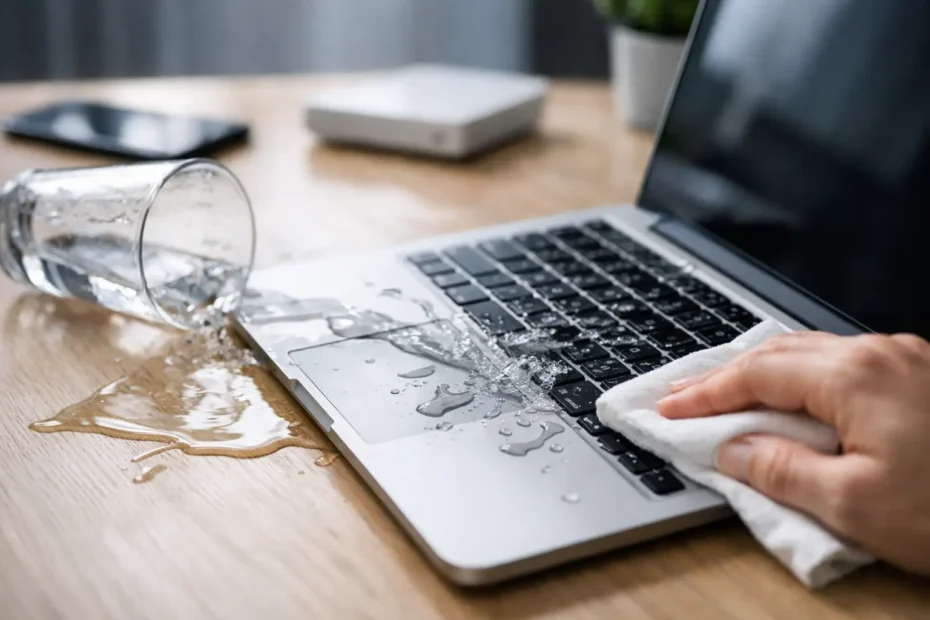
Coffee on the keyboard. Water in the speaker grille. A sweet drink running straight toward the trackpad. If you are searching for how to save spilled MacBook damage, the next 10 minutes matter more than almost anything you do after that.
Liquid damage is one of the few Mac problems that can go from repairable to dead logic board very quickly. The hard part is that a MacBook may seem fine at first, then fail hours or days later as corrosion spreads and shorted components finally give out. That is why the right response is not just about drying the outside. It is about stopping power, limiting damage, and avoiding the common mistakes that make professional recovery harder.
How to save spilled MacBook damage in the first minutes
The first move is simple – turn it off now. If the MacBook is on, shut it down immediately. If it will not respond, press and hold the power button until it powers off. Do not keep using it to finish an email, save a document, or test whether the keys still work. Electricity plus liquid is what causes the worst board-level damage.
Once it is off, unplug the charger and disconnect every accessory. If anything is attached by USB-C, Thunderbolt, headphones, or an SD card slot, remove it. External power and connected devices can create additional paths for shorts.
Now position the MacBook so liquid can drain away from the logic board and keyboard. A tent shape or upside-down V can help, depending on where the spill landed. The goal is not a perfect pose from the internet. The goal is to keep liquid from pooling deeper inside. Gently blot visible liquid with a lint-free cloth. Do not shake the computer around. That can move liquid into places it has not reached yet.
If the spill was plain water, your odds are usually better. If it was coffee, soda, juice, wine, milk, or anything sugary, acidic, or sticky, the risk is higher. Those liquids leave residue behind even after they seem dry, and residue keeps causing trouble.
What not to do after a MacBook spill
A lot of spilled MacBooks are not killed by the spill alone. They are killed by the cleanup attempt.
Do not plug it back in to see if it still works. Do not restart it after an hour. Do not put it in rice. Rice does not remove residue from the logic board, under chips, inside connectors, or beneath the keyboard layers. It mostly delays proper treatment.
Skip the hair dryer too. Heat can push moisture deeper, warp components, and create a false sense that the machine is safe to power. The same goes for leaving it in the sun or blasting it with a space heater.
Do not spray cleaners into the keyboard. Do not use canned air aggressively into ports. And unless you know exactly how Apple portables are built, do not start randomly opening and disconnecting parts. A careful internal inspection helps. Amateur disassembly often creates more damage, especially with battery connectors, fragile flex cables, and short-prone tools.
Why a spilled MacBook can fail later
This is where many people get caught off guard. The MacBook turns back on, so they assume they got lucky. Then two days later the battery stops charging, the keyboard misses keys, the screen loses backlight, or the machine goes completely dead.
That delayed failure is common because liquid damage is not always one big event. Sometimes it starts as minor contamination, then corrosion forms around power circuits, keyboard lines, display backlight components, or charging sections on the logic board. Sugary or mineral-heavy liquids are especially bad because they leave conductive and corrosive residue behind.
In other words, a MacBook that still works after a spill is not automatically a safe MacBook. It may simply be in the early stage of failure.
How to save a spilled MacBook if it still turns on
If the computer is still operating, resist the urge to keep using it for work. Backing up your data may be worth discussing in specific cases, but continuing normal use is risky. Every charging cycle, every wake event, and every bit of heat can make a partially damaged board worse.
If the files are critical and not backed up, this becomes a judgment call. Sometimes a technician will advise a controlled attempt at data preservation before deeper repair begins. It depends on the model, where the spill landed, whether the machine is stable, and whether the data is stored on a removable or soldered SSD design. For many newer MacBooks, storage is tied closely to the logic board, so protecting the board matters even more.
The safest path is inspection and professional internal cleaning as soon as possible. That usually means opening the machine, disconnecting the battery, checking the logic board and affected components under magnification, removing contamination, and testing for shorted or weakened circuits. Timing matters here. A same-day response is better than waiting until visible corrosion spreads.
When drying is not enough
People often ask how long they should let a MacBook dry. The honest answer is that drying alone is often the wrong benchmark.
Water can evaporate. Residue does not. Corrosion does not. Sticky liquid under an IC, around a connector, or beneath keyboard membranes will not become harmless just because the outside looks dry. That is why some spill cases need more than cleaning. They need component-level repair.
A shop that only swaps whole assemblies may recommend replacing the entire top case, battery, logic board, and sometimes the display if there is any sign of contamination. That can push the repair cost close to replacement value. In many spill cases, especially where the damage is limited to specific circuits, board-level diagnostics can make the difference between a saveable MacBook and a quote that makes no sense.
This is also where experience matters. Liquid damage is rarely a one-part problem. A MacBook may need keyboard treatment, a charging circuit repair, ultrasonic cleaning, and follow-up testing because one failed component can mask another. A careful technician looks for the full damage pattern, not just the first symptom.
Signs your MacBook needs immediate spill repair
Some symptoms mean the spill likely reached critical areas. If the MacBook will not turn on, does not charge, gets hot unusually fast, shows no backlight, types random characters, clicks the trackpad inconsistently, or has liquid under the display, do not keep experimenting with it.
Even less dramatic symptoms count. A few dead keys, fan behavior that suddenly changed, speakers that sound distorted, or USB-C ports that stop recognizing devices can all point to liquid intrusion. On newer models, a tiny damaged area on the board can affect multiple functions at once.
If the spill involved anything other than plain water, speed matters even more. Soda, coffee with cream and sugar, sports drinks, and alcohol can all leave behind contamination that gets worse with time.
Can a spilled MacBook really be saved?
Often, yes. But it depends on three things: how quickly power was removed, what liquid got inside, and whether the machine receives the right kind of repair.
Some MacBooks recover with prompt internal cleaning and no part replacement. Others need a keyboard, battery, trackpad cable, or port work. More serious cases require logic board repair under a microscope, where damaged chips, corroded pads, or shorted lines are identified and repaired instead of replacing the whole machine. And yes, there are cases that are too far gone, especially after repeated power-on attempts or long delays with corrosive liquid inside.
That said, many people are told a spill means total loss when the real issue is that the shop does not do component-level work. A repair-first approach can be the difference between saving the computer, recovering the data, or being pushed into replacement.
For Mac owners in Central Florida dealing with a spill, this is exactly the kind of case where a specialist matters. At YourMac.Repair, customers speak directly with Eduardo, not a counter staff member guessing at board damage. That direct diagnostic approach is useful when the question is not just whether the Mac powers on, but whether it can be properly cleaned, repaired, and trusted again.
The smartest next step after a spill
If you remember one thing, make it this: turn it off fast, keep it off, and do not confuse surface drying with actual recovery. The best outcomes usually come from early action and honest diagnostics, not hope.
A spilled MacBook is not always doomed. But it rarely benefits from waiting around on a towel while corrosion quietly spreads. Treat it like a repairable emergency, and you give the machine and your data the best chance you can.
Need Mac or iPhone repair in Winter Garden / Orlando?
YourMac.Repair — board-level Apple repair with honest diagnosis and fast turnaround. We say YES when Apple says NO.
- Mac Logic Board Repair — liquid damage specialist
- Mac Screen Repair
- Mac Battery Replacement
- Mac & PC Data Recovery
- iPhone Screen Repair — same-day service
📞 (407) 580-9965 · WhatsApp · 819 Marsh Reed Dr, Winter Garden, FL 34787