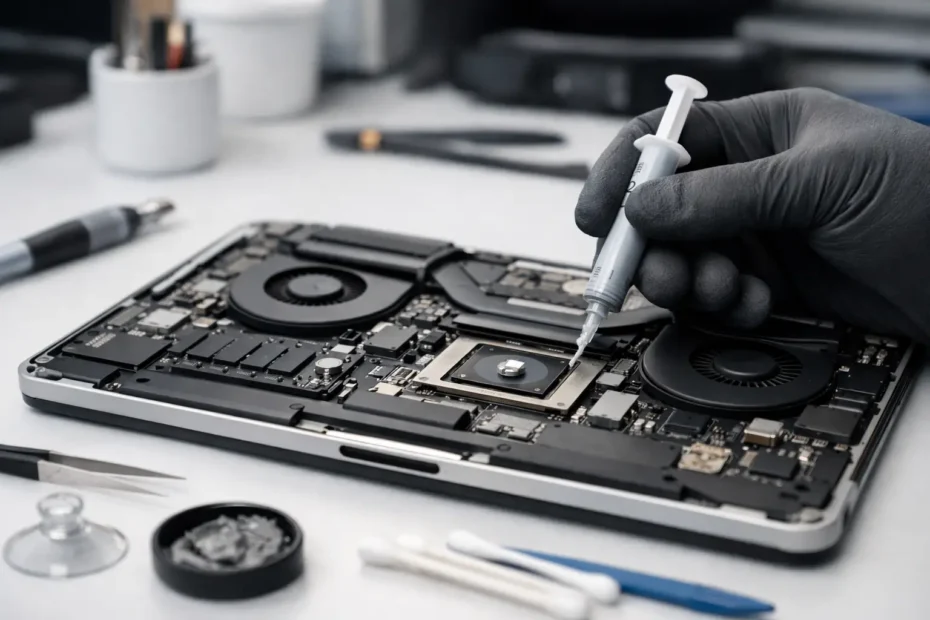
When a MacBook starts running hot enough to make the keyboard uncomfortable, or the fans stay loud during simple work, people usually assume the machine is just old. Sometimes that is true. Sometimes the real issue is much simpler: thermal paste replacement MacBook service is overdue, or the cooling system is packed with dust and no longer transferring heat the way it should.
This is one of those repairs that sounds minor but can make a noticeable difference on the right machine. It can lower operating temperatures, reduce thermal throttling, and help the Mac hold performance longer under load. But it is not magic, and it is not the right answer for every MacBook. If someone promises that fresh paste will turn every slow Mac into a cool, silent powerhouse, that is sales talk, not diagnosis.
What thermal paste replacement MacBook service actually does
Thermal paste sits between the processor and the heatsink. Its job is to fill microscopic gaps so heat can move efficiently from the chip into the cooling assembly. Over time, that compound can dry out, pump out, or simply lose effectiveness. When that happens, heat transfer gets worse, temperatures rise faster, and the cooling system has to work harder.
On a MacBook, that matters because the thermal design is compact and tightly engineered. There is not much room for wasted cooling performance. A small drop in heat transfer efficiency can mean earlier fan ramp-up, more aggressive throttling, and less stable behavior during demanding tasks like video editing, music production, coding, or even long browser sessions with multiple tabs and external displays.
Replacing the thermal compound restores the contact surface between the chip and heatsink. In many cases, that helps the system shed heat more effectively. The result can be lower peak temperatures and more consistent performance, especially on older Intel-based MacBooks.
When thermal paste replacement on a MacBook makes sense
The best candidates are usually MacBooks that are several years old, run hotter than they used to, and have never had internal maintenance. This is especially common on Intel MacBook Pro models that spend a lot of time under load. If the fans are constantly active, the machine feels hot during normal use, or performance drops sharply once the system warms up, thermal compound replacement may be worth considering.
It also makes sense when the MacBook is already being opened for another repair. If the heatsink has to come off during logic board work, deep internal cleaning, or certain component-level repairs, replacing the paste at the same time is simply smart maintenance.
There are also cases where the problem is obvious from the symptoms but the fix still depends on inspection. A MacBook with dried thermal paste may overheat, but so can a machine with clogged fans, warped heatsink contact, a failing sensor, battery swelling that affects internal fitment, or liquid damage that is creating power and heat issues elsewhere on the board. That is why diagnosis matters more than guessing.
Signs your MacBook may need new thermal paste
A few patterns show up again and again. The first is fan noise that seems out of proportion to the task. If a MacBook sounds like it is exporting a movie when all you are doing is email and web browsing, cooling efficiency may be slipping.
The second is heat soak. The machine starts out fine, then slows down after 10 to 20 minutes of use. Apps become less responsive, export times stretch out, and the chassis gets much hotter than normal. That often points to a system that can no longer move heat away from the processor efficiently enough.
The third is age combined with use. A lightly used MacBook may go years without needing thermal service. A heavily used one that lives on a desk, works with dust in the environment, or spends hours every day under sustained load is a different story.
What thermal paste replacement will not fix
This is where honesty matters. Fresh thermal paste does not fix every heat-related complaint.
If a MacBook is slow because the SSD is failing, the battery is degraded, the operating system is corrupted, or background processes are consuming resources, replacing paste will not solve the real problem. The same is true if the machine has liquid damage, sensor faults, or a fan that is physically failing.
It also will not turn a passively cooled or lightly cooled Mac into something it was never designed to be. Some MacBooks simply run warm by design, especially under modern workloads that push older hardware harder than Apple originally intended.
And on many Apple Silicon models, thermal behavior is different from older Intel Macs. Those machines are often much more efficient to begin with, so the value of thermal paste service depends heavily on the specific model, the symptoms, and whether there is a measurable issue to correct.
Why the quality of the job matters
A proper thermal paste replacement MacBook job is not just about applying new compound. The old material has to be removed carefully and completely. Contact surfaces need to be cleaned correctly. The right amount of new compound has to be applied, and the heatsink must be reinstalled with proper alignment and even pressure.
Too much paste is not better. Too little is not better either. Wrong compound choice, uneven mounting, stripped screws, damaged connectors, or rushed reassembly can create more problems than the original heat issue.
On many Macs, getting to the cooling assembly is not trivial. You are dealing with delicate flex cables, tightly packed internals, battery safety concerns, and in some models, a high risk of turning a maintenance job into an expensive repair if the unit is handled carelessly. That is why experience matters. This is not the same as repasting a desktop tower with plenty of room and easy access.
Thermal paste replacement vs full internal cleaning
These services often belong together, but they are not identical. Replacing thermal paste improves heat transfer between the processor and heatsink. Internal cleaning removes dust and debris from fans, vents, and cooling pathways.
If a MacBook has dust packed into the fan blades or exhaust path, fresh paste alone may help only a little. On the other hand, if the vents are clean but the compound has hardened over years of heat cycles, cleaning alone will not address the core issue.
The best results usually come from addressing the complete thermal system, not just one piece of it. That means evaluating fan function, airflow, heatsink condition, sensor reporting, and overall internal cleanliness before deciding what the Mac actually needs.
Is DIY thermal paste replacement on a MacBook worth it?
It depends on the model and on your comfort level with Mac internals. Some technically experienced owners can do it successfully. Many others discover halfway through that a YouTube video made it look easier than it is.
The risk is not just cosmetic. A torn flex cable, a damaged battery, a slipped tool, or a connector that is not seated correctly can leave you with a no-power or no-display problem that did not exist before. On a MacBook holding business files, client work, school projects, or family data, that is a bad place to save money.
If the MacBook is already showing unusual behavior beyond heat, DIY becomes even riskier because thermal symptoms can overlap with logic board faults. In those cases, replacing paste without testing the rest of the system can waste time and delay the actual repair.
What to expect from professional service
A good technician should tell you whether thermal paste replacement is likely to help before treating it like a default answer. That means looking at symptoms, model history, internal condition, fan behavior, and the possibility of other faults.
On the right MacBook, professional thermal service can lead to lower temperatures, quieter operation, and more stable performance under sustained use. On the wrong MacBook, an honest technician should say so and point you toward the repair that actually fits the problem.
That direct, repair-first approach is what matters most. At YourMac.Repair, customers work directly with Eduardo, not a front counter reading from a script. That matters when your Mac is overheating, slowing down, or showing mixed symptoms, because the right fix starts with real diagnosis, not guessing.
If your MacBook is running hotter than it should, the smart move is not to assume the answer. It is to find out why the heat is building up in the first place, then fix the part of the system that is actually failing.
Need Mac or iPhone repair in Winter Garden / Orlando?
YourMac.Repair — board-level Apple repair with honest diagnosis and fast turnaround. We say YES when Apple says NO.
- Mac Logic Board Repair — liquid damage specialist
- Mac Screen Repair
- Mac Battery Replacement
- Mac & PC Data Recovery
- iPhone Screen Repair — same-day service
📞 (407) 580-9965 · WhatsApp · 819 Marsh Reed Dr, Winter Garden, FL 34787