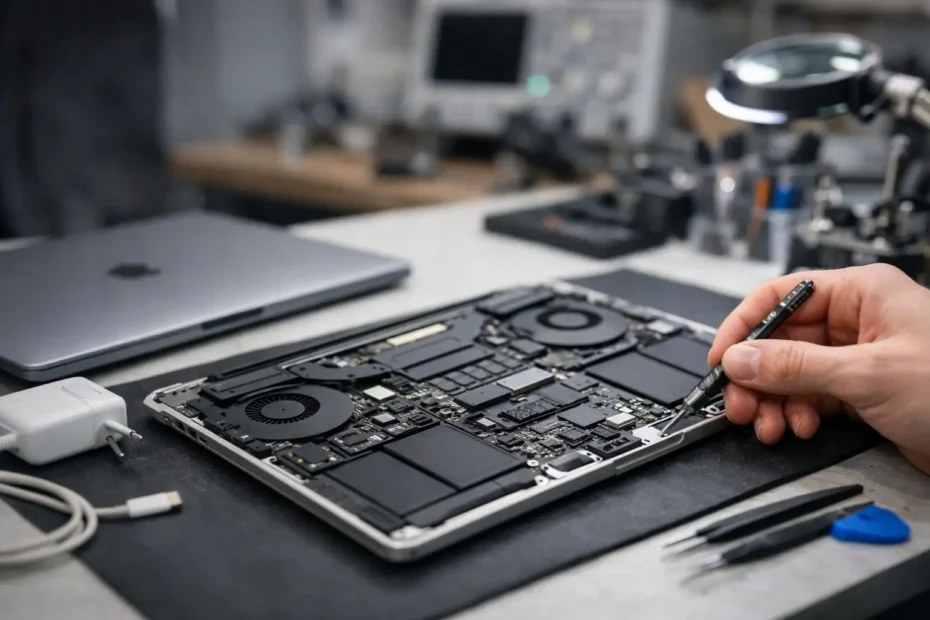
A MacBook that shows no sign of life is rarely as simple as a dead battery. If you are searching for macbook no power repair, the real question is not just how to turn it back on. The real question is what failed, whether the data is safe, and whether the machine needs a smart repair or an expensive replacement that could have been avoided.
No power symptoms can look identical on the surface. You press the power button and get nothing. No fan spin, no chime, no backlight, no charging response, no startup sound, and sometimes not even a USB-C current draw that makes sense. But underneath that symptom, several very different failures may be causing the problem.
MacBook no power repair starts with diagnosis
This is where many owners lose time and money. A shop that does not perform board-level diagnostics may default to broad guesses. They might suggest a battery, a charging port, a top case, or even a full logic board replacement before proving which part actually failed.
A proper no power diagnosis is narrower and more technical. The first step is confirming whether the charger, cable, battery, and USB-C negotiation are behaving normally. After that, the logic board has to be checked for the presence or absence of critical power rails. If one main rail is missing, the MacBook will not even begin its startup sequence. If the rails are present but one subsystem is shorted or unstable, the machine may stay completely dead or pulse briefly and shut back down.
This matters because the repair path depends entirely on what the board is doing electrically. Two MacBooks can both look dead on the outside, while one needs a relatively contained component repair and the other has severe liquid damage with multiple affected circuits.
What usually causes a dead MacBook
Battery failure is one possibility, but it is far from the only one. On newer MacBook models, power problems often involve the USB-C charging circuit, CD3215 or related controller chips, shorted capacitors, failed MOSFETs, corrosion from liquid exposure, damaged current sensing components, or faults in the always-on power rail. On some Intel models and older machines, SMC-related issues, DC-in problems, or corroded keyboard power lines can also keep the computer from responding.
Liquid damage is a major reason a MacBook suddenly has no power. A spill does not need to be dramatic to create a serious fault. Even a small amount of residue can corrode a line, bridge nearby components, or slowly eat away at pads and traces over time. Some machines die immediately after a spill. Others continue working for weeks and then fail with no warning.
Physical damage also plays a role. A drop can crack solder joints, damage USB-C ports, or create board flex issues that interrupt power delivery. Then there is wear over time. Heat cycles, aging components, and previous poor-quality repair work can all lead to a no power condition.
Why Apple and many shops jump to replacement
From a business standpoint, replacement is faster to quote. If a store is not equipped for micro-soldering, microscope inspection, schematic-based diagnostics, and board-level testing, a dead MacBook becomes a module swap problem. That usually means replacing the entire logic board.
The trade-off is cost. Full board replacement can be expensive enough to push customers toward buying another computer. It can also complicate data recovery, especially if the internal storage is tied to the original board. In many cases, the failed area is limited to a charging circuit, a shorted line, or a cluster of damaged components that can be repaired without replacing the whole board.
That does not mean every board should be repaired. Some machines have extensive corrosion, severe multilayer board damage, or multiple failures that make repair poor value. Honest diagnosis matters here. The best answer is not always repair at any cost. The best answer is the one that makes sense for the machine, the budget, and the importance of the data.
What a real MacBook no power repair process looks like
A serious repair begins with inspection and measurement, not guesswork. The bottom cover comes off, the board is checked for obvious liquid damage or burned areas, and the charging behavior is measured. On USB-C models, current draw patterns often tell an experienced technician a lot before deeper testing even starts.
From there, power rails are checked in sequence. If a rail is missing, the next step is figuring out whether the issue is a short, a bad control signal, a failed IC, or corrosion interrupting the circuit. Thermal imaging, diode mode readings, resistance checks, and voltage injection may all be used depending on the symptom.
Once the failed section is identified, the repair can involve replacing a chip, capacitor, fuse, MOSFET, connector, or repairing damaged pads and traces. After that, the board still has to be tested as a system. A MacBook that powers on is not automatically repaired well. It also needs stable charging, normal startup, proper sleep and wake behavior, battery communication, and enough testing to catch intermittent faults.
That is the difference between a quick resurrection and a dependable repair.
When data recovery becomes part of the job
For many people, the computer matters less than what is on it. If the MacBook will not power on and there is no current backup, repair strategy changes. The goal may be to restore full function, or it may simply be to get the machine stable enough to access the data.
This is especially important on newer models where storage is soldered to the logic board. If someone replaces the board without planning for data, the original files may still be stranded on the failed board. In a no power case, protecting data should be part of the conversation early, not after parts have already been swapped.
That is one reason direct communication with the technician helps. You can explain whether the priority is turnaround, lowest cost, long-term reliability, or recovering irreplaceable files. Those are not all the same job.
Is it worth fixing a MacBook with no power?
It depends on the model, the cause of failure, and what you need from it. A newer MacBook Pro or Air with a localized board fault is often well worth repairing, especially if the alternative is a very expensive replacement. If the machine is in otherwise good condition, board-level repair can extend its life for a fraction of replacement cost.
For older machines, the answer is more nuanced. If the issue is straightforward and the computer still fits your needs, repair can make perfect sense. If the board has heavy liquid damage and the battery, keyboard, and screen are also nearing end of life, it may not be smart to keep investing in it.
The key is getting a diagnosis detailed enough to make that decision confidently. Not a vague statement that it needs a board, but an explanation of what failed and what the repair is trying to solve.
What to do before you bring in a dead MacBook
Do not keep trying random chargers if the machine has signs of liquid exposure or gets warm in one area. Repeated power attempts can worsen a short. If there was a spill, stop using it and do not try home remedies like rice, hair dryers, or opening the machine without knowing what to look for.
If the MacBook died after using a low-quality charger or hub, mention that during intake. If it failed after a spill, a drop, or a battery warning, that history helps narrow the fault faster. Good repair work starts with good information.
If your files are critical, say that upfront. A technician can approach the job with data preservation in mind from the beginning.
Choosing the right shop for macbook no power repair
This is one of the repairs where experience shows quickly. You want a specialist who can explain the failure clearly, perform component-level work when appropriate, and tell you honestly when repair is not worth it. You also want someone who understands that a no power MacBook is often an urgent problem tied to work, school, or business continuity.
At YourMac.Repair, customers speak directly with Eduardo, a specialist with more than 30 years of Apple repair experience. That matters when the issue is not basic parts swapping but advanced diagnosis, logic board repair, and figuring out the most sensible path forward.
A dead MacBook does not always mean the end of the machine. Sometimes it means one failed chip, one corroded line, or one shorted rail standing between you and a working computer again. The value is in finding out which kind of problem you actually have before anyone tells you to replace it.
Need Mac or iPhone repair in Winter Garden / Orlando?
YourMac.Repair — board-level Apple repair with honest diagnosis and fast turnaround. We say YES when Apple says NO.
- Mac Logic Board Repair — liquid damage specialist
- Mac Screen Repair
- Mac Battery Replacement
- Mac & PC Data Recovery
- iPhone Screen Repair — same-day service
📞 (407) 580-9965 · WhatsApp · 819 Marsh Reed Dr, Winter Garden, FL 34787