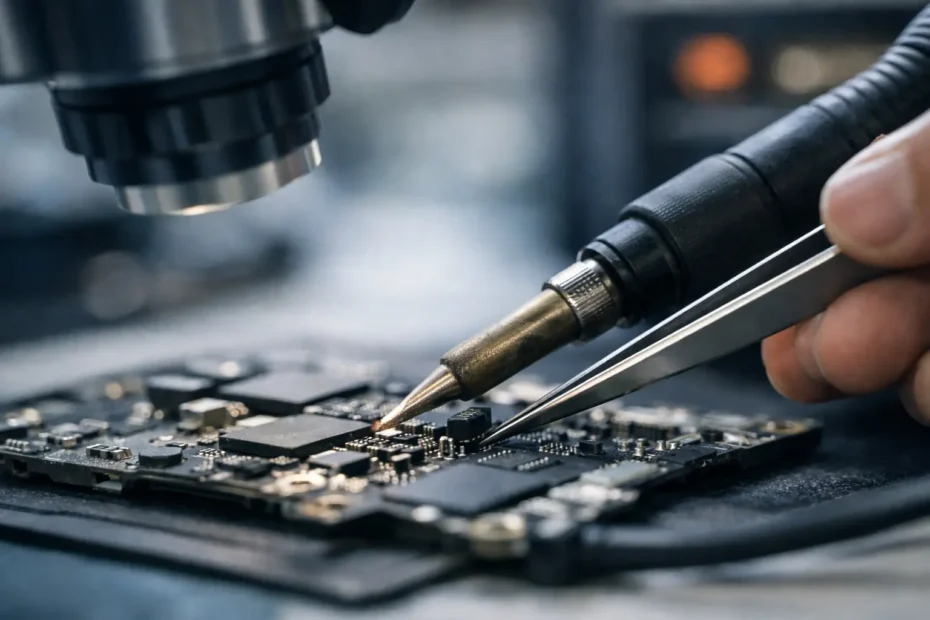
A logic board microsoldering repair example is often more useful than a generic promise to “fix liquid damage.” It shows why a Mac that appears completely dead may still be repairable, what a specialist actually tests, and why replacing an entire board is not always the only answer.
Consider a common situation: a MacBook Pro comes in after a small drink spill near the left side of the keyboard. It worked for a few hours, then shut down. By the next morning, it would not charge, show a battery icon, or respond to the power button. An Apple Store or many general repair shops may classify this as a logic board failure and recommend board replacement. That can be expensive, and on many newer Macs it can also put the customer’s files at risk.
Board-level repair takes a different path. The goal is to find the failed circuit, determine whether the damage is isolated, and repair only what makes sense. That is not magic, and it is not the right answer for every Mac. But when the issue is localized, microsoldering can save a computer, protect data, and avoid paying for a full board replacement.
Logic Board Microsoldering Repair Example: A No-Power MacBook
The MacBook in this example had no visible signs of life. The USB-C charger was known good, but the computer was pulling almost no power. That immediately narrowed the investigation. A Mac needs several power rails to appear in the proper order before it can boot. If the charging circuit cannot communicate correctly with the USB-C adapter, or if a shorted component drags down a critical rail, the Mac may remain completely dead.
The first step was not to start heating components. It was inspection and measurement.
After opening the MacBook, the logic board showed minor corrosion around a power-management area. Liquid does not always leave obvious residue directly under the spill location. It can travel through openings, wick under shields, and remain under small components where it continues corroding metal long after the surface looks dry.
The board was carefully inspected under magnification. Then the technician measured resistance to ground on key power rails and checked for expected voltage at the charging and power-management circuits. One rail showed an abnormal low-resistance condition, indicating a likely short rather than a simple battery or charger problem.
That distinction matters. Replacing a battery will not correct a shorted power rail. Replacing the entire logic board may solve it, but it also replaces every working circuit along with the failed one.
Finding the Actual Failed Part
Once testing pointed to a short, controlled voltage was applied to the affected rail with a current-limited bench power supply. A thermal camera and freeze spray can help locate the component converting that electrical energy into heat. In this case, a tiny capacitor near a power-management integrated circuit warmed quickly.
The failed capacitor was only a few millimeters wide. It had shorted internally after liquid exposure and was preventing the rail from operating normally. Removing it cleared the short, but that did not end the job. A capacitor is part of a carefully designed circuit. The board must be checked to confirm the correct value, proper pad condition, and whether neighboring components or the underlying power-management chip were also damaged.
Under a microscope, the damaged capacitor was removed using hot air at controlled temperature and airflow. The pads were cleaned, inspected for corrosion, and prepared with fresh solder. A matching replacement component was installed and aligned properly. The surrounding area was then cleaned to remove flux residue and any remaining contamination.
This is where experience matters. Too much heat can damage nearby chips, lift fragile board pads, or affect multilayer traces hidden inside the logic board. Too little heat or poor solder flow can leave a weak connection that fails later. Microsoldering is precise work, but it is only one part of a successful repair. Accurate diagnosis comes first.
Testing After a Microsoldering Repair
After the replacement, the short was gone. The next power-up check showed normal behavior from the USB-C charging circuit, and the Mac began requesting the expected amount of power from the charger. That was encouraging, not final proof.
A proper repair process continues through staged testing. The board was checked for the correct always-on power rails, then for power-button response, display output, battery charging, keyboard and trackpad operation, Wi-Fi, audio, camera, ports, and sleep-wake behavior. The Mac was also allowed to run under load to make sure the repair remained stable as temperature increased.
Because this was a liquid-damaged machine, the inspection extended beyond the original shorted component. Liquid damage can create more than one problem. A Mac may power on after the primary repair but still have a nonworking port, intermittent keyboard behavior, reduced charging performance, or a future corrosion issue if contamination was left behind.
In this example, the Mac booted successfully and the customer’s data was intact. That outcome is especially valuable on models with soldered storage, where the files may be tied directly to the original logic board. On many recent Macs, replacing the board is not the same as moving the drive into another computer. The original data may not be accessible without the original board functioning.
Why a Board Repair Can Cost Less Than Replacement
A logic board replacement is a broad solution. It can be appropriate when damage is extensive, multiple major chips have failed, the board is physically cracked, or corrosion has spread through several critical areas. It may also be the practical choice when repair time would exceed the value of an older Mac.
But a component-level repair is often the more sensible option when testing identifies a limited failure. Replacing one failed capacitor, charging chip, backlight circuit component, fuse, or power-management-related part can cost far less than replacing a complete logic board. It also preserves the original board, original configuration, and potentially irreplaceable files.
Price depends on the Mac model, the extent of corrosion, the failed circuit, and the time required for diagnosis and testing. No honest technician should quote a guaranteed board repair price before examining the device. A transparent diagnosis should explain what failed, what can be repaired, what the risks are, and whether the repair is economically worthwhile.
What This Example Does Not Mean
Not every no-power Mac has a shorted capacitor. A dead MacBook can have a failed battery, damaged charging port, bad USB-C cable, defective display, corrupted firmware, failed storage, liquid damage to several circuits, or a deeper processor-level issue. The symptom is the starting point, not the diagnosis.
Likewise, a Mac that turns on but has no backlight may need a completely different repair. It could be a display problem, a damaged backlight line, a fuse, a connector issue, or a failure caused by prior repair work. The right approach is to test the circuit path rather than assume the most expensive part has failed.
Microsoldering also has limits. Severe liquid damage may continue to cause trouble if corrosion has reached hidden layers of the board or several areas were affected. A reputable repair specialist will say so before taking on a job. Repair-first does not mean repair-at-any-cost. It means giving the customer a real option based on evidence instead of immediately defaulting to replacement.
When to Bring a Mac in Quickly
If a Mac has been exposed to liquid, speed can improve the odds of a successful repair. Shut it down if possible, disconnect power, and do not keep trying to charge or restart it. Repeatedly applying power to a wet or corroded board can turn a manageable component failure into more extensive damage.
Avoid rice, hair dryers, and aggressive heat. Rice does not remove mineral residue or corrosion, and heat can push moisture deeper into sensitive areas. The useful next step is professional inspection, internal cleaning where appropriate, and electrical testing before further power is applied.
For Mac owners in Winter Garden, Orlando, and Central Florida, YourMac.Repair provides direct access to Eduardo, a specialist with more than 30 years of Apple experience. That means you can discuss the actual symptoms, diagnosis, repair options, and data concerns with the person working on the device.
A failed logic board does not automatically mean a lost Mac or lost files. The best next step is a careful diagnosis that treats the board as a repairable system, not a disposable black box.
Need Mac or iPhone repair in Winter Garden / Orlando?
YourMac.Repair — board-level Apple repair with honest diagnosis and fast turnaround. We say YES when Apple says NO.
- Mac Logic Board Repair — liquid damage specialist
- Mac Screen Repair
- Mac Battery Replacement
- Mac & PC Data Recovery
- iPhone Screen Repair — same-day service
📞 (407) 580-9965 · WhatsApp · 819 Marsh Reed Dr, Winter Garden, FL 34787