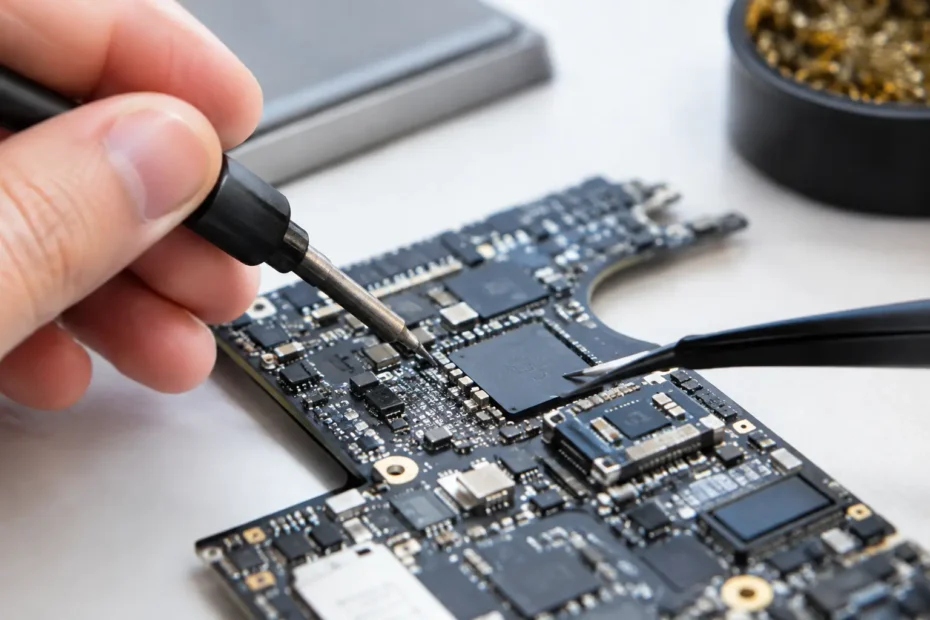
A MacBook that will not charge, has no backlight, or died after a spill is often written off too quickly. Micro soldering gives a qualified repair specialist the ability to diagnose and repair damage on the logic board itself, rather than replacing an entire board or declaring the Mac beyond repair. For owners with important files, an expensive newer Mac, or a machine that is otherwise in good condition, that difference can be substantial.
What Micro Soldering Means for Your Mac
Micro soldering is component-level electronic repair performed under magnification. A technician uses specialized tools, controlled heat, and precision equipment to test and repair tiny chips, connectors, resistors, capacitors, and circuit traces on a Mac logic board.
This is very different from swapping a battery, screen, keyboard, or charging cable. Those are legitimate repairs, but they do not address failures within the board that controls power, charging, display output, storage communication, USB-C ports, and other core functions.
When Apple or a standard repair shop finds logic board damage, the usual recommendation is board replacement. That can be practical in some cases, especially when a replacement is reasonably priced and data is not a concern. But a board replacement can be expensive, may not be available for older models, and can leave data inaccessible when the original board contains the storage or encryption keys. Repairing the original board may preserve both the Mac and the information on it.
Problems Micro Soldering Can Address
Logic board repair is not one single service. The correct repair depends on what failed, why it failed, and whether the damage is limited or widespread. Micro soldering is commonly used for Macs with charging failures, no-power conditions, liquid damage, display backlight faults, and damaged ports.
A MacBook may show no response at all when the power button is pressed. It may turn on briefly, cycle repeatedly, or draw power from the charger without actually booting. On USB-C models, one or more ports may stop charging while others still work. These symptoms can come from a failed charging controller, a shorted capacitor on a power rail, corrosion around a power-management circuit, or damage to a USB-C controller.
Backlight issues are another common example. A Mac can boot normally and even work with an external display, yet its built-in screen appears black or extremely dim. The screen is not automatically the problem. Depending on the model and symptoms, the fault may be in the display itself, the display cable, a connector, or the logic board circuit that provides backlight power.
Liquid damage is where careful board-level work becomes especially valuable. Even a small spill can create corrosion that continues to spread after the Mac seems to dry out. Coffee, soda, wine, and other liquids leave residue that can conduct electricity and damage components over time. Simply waiting for the computer to dry does not remove that residue. A proper assessment may involve opening the Mac, inspecting the board under magnification, cleaning affected areas, and testing circuits before deciding whether component replacement is needed.
Why Diagnosis Comes Before Repair
The hardest part of micro soldering is often not soldering. It is finding the actual fault without replacing good parts or creating unnecessary cost.
A reliable diagnosis starts with the Mac’s history. Did it fail immediately after a spill? Did charging become intermittent over several weeks? Did the screen go dark after a drop? Did the computer work normally until an update, battery failure, or overheating event? Those details help narrow the path, but they are only the starting point.
The technician then checks for visible corrosion, missing components, damaged connectors, and signs of prior repair attempts. Electrical testing follows. Voltage measurements, resistance readings, thermal imaging when appropriate, and board schematics can reveal whether a critical power rail is shorted or a controller is not receiving the signals it needs to operate.
This process matters because similar symptoms can have very different causes. A MacBook that will not charge could need a charger, battery, USB-C port assembly, charging circuit repair, or multiple repairs after liquid damage. Replacing parts based on a guess can become expensive without solving the underlying problem.
At YourMac.Repair, customers work directly with Eduardo, a specialist with more than 30 years of Apple experience. That direct communication helps make the diagnosis easier to understand: what was found, what repair is recommended, what the expected cost is, and when replacement may make more sense.
What a Board-Level Repair Actually Involves
Once the failed circuit or component has been identified, the repair must be performed with precision. Modern Mac logic boards are densely built, with delicate pads, tightly packed components, and heat-sensitive areas. A technician may use a microscope, hot-air rework station, soldering iron with fine tips, flux, preheater, precision tweezers, and diagnostic equipment.
The repair may involve removing corrosion, rebuilding a damaged trace, replacing a failed capacitor, installing a new connector, or removing and reinstalling a complex integrated circuit. Certain chip repairs require reballing, which means replacing the microscopic solder balls beneath the chip before it can be reinstalled correctly.
Good work does not end when the Mac powers on. The board needs to be tested for stable charging, current draw, sleep and wake behavior, display function, Wi-Fi, keyboard and trackpad response, ports, audio, and other functions affected by the original issue. A machine that starts once but overheats, fails to charge, or shuts down under load has not been fully repaired.
When Micro Soldering Is Worth It
The decision usually comes down to value, data, condition, and repair scope. For a recent MacBook Pro or MacBook Air, component-level repair can be far less costly than replacing the logic board or buying a new computer. It can also be an excellent option for a well-maintained older Mac that still meets your needs, particularly if it has been upgraded with more storage or has a high-quality display and battery.
Data can change the equation completely. On many newer Macs, storage is integrated with the logic board. If the board cannot boot, recovering files may require restoring enough board function to access the original storage. A replacement board may get the computer working again, but it does not automatically recover the data from the damaged one.
There are limits. Severe corrosion across multiple areas, fire damage, extensive physical board damage, or a failed processor can make repair impractical. In other cases, the repair may be technically possible but not cost-effective compared with replacement. An honest shop should explain that clearly rather than promising a fix before the board has been properly evaluated.
Protecting Your Mac After a Spill or Failure
If liquid reaches your Mac, turn it off as soon as possible and disconnect power. Do not keep trying to start it, and do not repeatedly plug in chargers to see whether it will come back. Each attempt can send power through contaminated areas and worsen the damage.
Avoid rice, hair dryers, and internet shortcuts that focus only on drying. The concern is not just moisture. It is corrosion and residue inside the computer. Getting the Mac assessed quickly gives it the best chance of avoiding deeper damage, especially when files are valuable.
For charging, display, or no-power problems that did not involve liquid, do not assume a logic board repair is automatically needed. A professional diagnostic can separate a straightforward peripheral or battery issue from a component-level failure. That protects you from paying for more repair than the Mac actually requires.
A failed Mac does not always need a new logic board, and it does not always need to be replaced. When the diagnosis points to a repairable board-level fault, micro soldering can be the practical path back to a working computer and, in many cases, the data that matters most.
Need Mac or iPhone repair in Winter Garden / Orlando?
YourMac.Repair — board-level Apple repair with honest diagnosis and fast turnaround. We say YES when Apple says NO.
- Mac Logic Board Repair — liquid damage specialist
- Mac Screen Repair
- Mac Battery Replacement
- Mac & PC Data Recovery
- iPhone Screen Repair — same-day service
📞 (407) 580-9965 · WhatsApp · 819 Marsh Reed Dr, Winter Garden, FL 34787