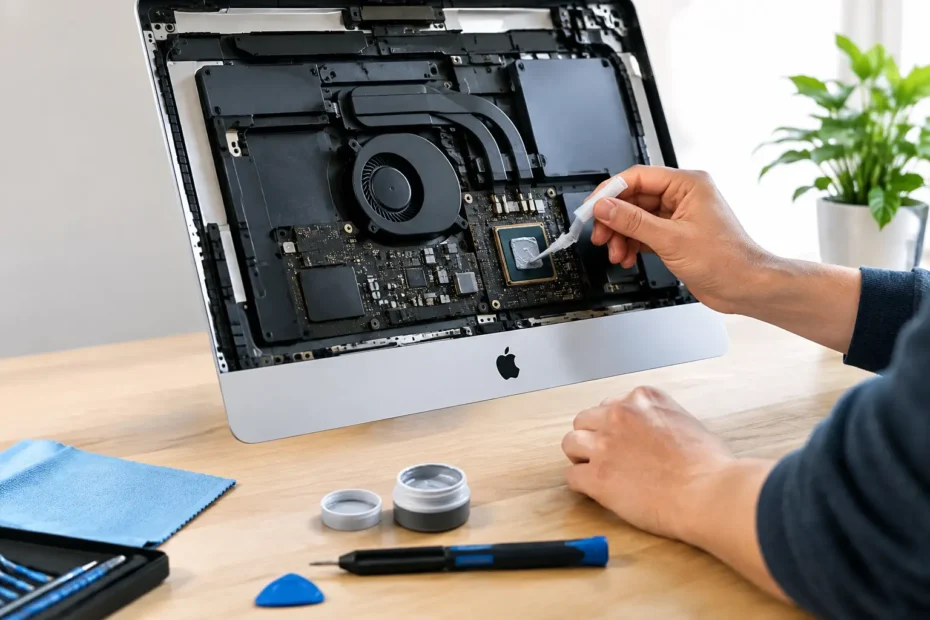
An iMac that suddenly sounds like it is preparing for takeoff is not always failing, but it is asking for attention. Thermal paste replacement for iMac is often the right maintenance service for an older Intel model that runs hot, throttles during work, or keeps its cooling fans at high speed. It is not a cosmetic repair, and it is not a universal cure. Done for the right reason, however, fresh thermal compound can help an aging iMac run cooler, quieter, and more reliably.
For professionals, students, creatives, and small businesses, that matters. Heat does not just make a Mac uncomfortable to use. Long-term high temperatures can reduce performance, strain nearby components, and turn simple tasks such as video calls, photo exports, and browser-based work into frustratingly slow experiences.
What Thermal Paste Does Inside an iMac
Thermal paste, also called thermal compound, sits between a processor or graphics chip and its heat sink. The metal surfaces look smooth, but at a microscopic level they contain tiny gaps. Thermal compound fills those gaps so heat can travel efficiently from the chip into the heat sink, where fans can move it out of the machine.
Over years of heat cycles, the compound can dry, harden, or lose its ability to transfer heat effectively. This is most common in older Intel iMacs, especially machines used for demanding work or kept running for long stretches. A graphics-heavy 27-inch iMac used for design, video editing, CAD, or music production may show the problem sooner than a lightly used office computer.
Apple silicon iMacs have a different internal design and generally do not reach the age where thermal compound service is a routine concern yet. The need depends on the model, its workload, its environment, and the actual temperature readings – not simply the device’s age.
Signs an iMac May Need Thermal Paste Replacement
A constantly active fan is the symptom most owners notice first. Fans can speed up for valid reasons, such as an active software update, a large file export, or a warm room. The concern is when the noise is frequent, persistent, or out of proportion to what you are doing.
Other warning signs include a noticeable slowdown during demanding tasks, unexpected shutdowns, heat around the lower display or rear vent area, and a machine that becomes loud even while handling ordinary work. Some iMacs will reduce processor speed to protect themselves when temperatures climb. This is called thermal throttling, and it can make a capable Mac feel much older than it is.
A service provider should verify the cause before recommending new thermal paste. High temperatures may also come from dust-packed heat sinks, failing fans, aging hard drives, runaway background processes, malware, a damaged temperature sensor, or a logic board issue. Replacing thermal compound without diagnosis can waste time and money while leaving the real problem untouched.
Heat and fan noise are not the same diagnosis
An iMac can have loud fans and perfectly good thermal paste. For example, a failing mechanical hard drive can create extra heat, while a stuck software process may keep the CPU busy even when no applications appear open. On certain iMac generations, an incorrect replacement drive or missing temperature-sensor solution can cause fans to run at full speed.
That is why a proper repair begins with inspection, system checks, temperature behavior under load, and a look inside the machine. The goal is to fix the reason your iMac is overheating, not to sell a service based on one symptom.
Why This Is Not a Simple DIY Job
Online videos can make iMac disassembly look routine. In practice, opening many iMac models requires carefully cutting the display adhesive, disconnecting fragile display cables, removing components in the correct order, and resealing the screen correctly. A small mistake can damage the display, crack the glass, tear a cable, or leave the screen improperly secured.
The thermal paste itself is inexpensive. The labor is in accessing the heat sink safely and restoring the computer correctly. Depending on the model, this may require removing the display, logic board, power supply, speakers, drives, and cooling assembly. Some models also use thermal pads that need to be measured and replaced properly. Substituting the wrong pad thickness can create poor contact or pressure where it does not belong.
Using too much compound is another common DIY problem. More paste does not improve cooling. A thin, controlled application is what creates proper contact between the chip and heat sink. The heat sink must also be tightened evenly so pressure is distributed correctly.
There is also a data consideration. Thermal work does not normally affect stored files, but any time a computer is opened and serviced, a current backup is the smart move. If the iMac already has drive errors, random restarts, or no-boot behavior, those issues should be diagnosed before treating thermal maintenance as the priority.
What a Professional Thermal Service Should Include
A quality thermal paste replacement for iMac should be more than applying new compound and closing the case. The machine should be inspected for dust accumulation, fan condition, heat-sink blockage, aging storage hardware, and any signs of liquid residue or component damage.
During service, the old compound should be fully removed from the processor, graphics processor where applicable, and heat sink contact surfaces. The technician should apply an appropriate high-quality thermal compound, inspect or replace thermal pads when the design requires it, and clean the cooling path without damaging delicate components.
After reassembly, testing matters. The display must be resealed correctly, fans should respond normally, and the Mac should be checked under realistic load. A repair is not complete just because the iMac turns on. It should be evaluated for temperature stability, noise, performance, and any remaining hardware concerns.
At YourMac.Repair, this kind of work is approached as part of an honest diagnosis. Eduardo works directly with customers, so you can discuss what the machine is doing, what testing found, and whether thermal service is actually the best use of your repair budget.
When Thermal Paste Is Worth Replacing
Thermal service is most worthwhile when an Intel iMac is otherwise in good condition and still fits your needs. A 2012 through 2020 iMac with sufficient memory, healthy storage, and a useful display can remain a productive computer for years. Pairing internal cleaning and thermal compound replacement with an SSD upgrade can make a major difference on models still using a mechanical hard drive or Fusion Drive.
It may be less worthwhile if the iMac has a failing graphics card, repeated kernel panics, severe corrosion, an unstable power supply, or repair costs that exceed the value of a practical replacement. Even then, the answer is not always obvious. A machine with valuable data, specialized software, or a large Retina display may still justify repair. The decision should be based on a clear diagnosis and a fair estimate, not pressure to replace a computer that can be saved.
How often should it be replaced?
There is no fixed schedule for iMac thermal paste replacement. It is not like changing oil in a car. Many machines can run for years without needing it, while others benefit after five to eight years because of heavy use, dust exposure, or sustained high operating temperatures.
The better question is whether the Mac has a verified cooling problem and whether fresh compound will address it. Preventive service can make sense for an older iMac already being opened for an SSD upgrade, deep cleaning, or another internal repair. Opening a healthy machine solely because of its age is usually unnecessary.
Do Not Ignore Sudden Overheating
If your iMac starts overheating abruptly, shutting down, or producing a burning smell, stop using it until it can be checked. Sudden changes are less likely to be ordinary thermal-paste aging and more likely to involve a fan failure, blocked airflow, electrical issue, or software process driving the system hard.
Keep the rear ventilation area clear, avoid using the iMac in enclosed cabinetry, and make sure it is not sitting in direct Florida sun. Those basic steps help, but they cannot compensate for dried compound, clogged heat sinks, or failing internal hardware.
A quieter, cooler iMac is often the result of careful diagnosis rather than a quick fix. If your machine is running hot or struggling under work it once handled easily, get the actual cause identified first. The right repair can extend the useful life of a Mac you already know and rely on.
Need Mac or iPhone repair in Winter Garden / Orlando?
YourMac.Repair — board-level Apple repair with honest diagnosis and fast turnaround. We say YES when Apple says NO.
- Mac Logic Board Repair — liquid damage specialist
- Mac Screen Repair
- Mac Battery Replacement
- Mac & PC Data Recovery
- iPhone Screen Repair — same-day service
📞 (407) 580-9965 · WhatsApp · 819 Marsh Reed Dr, Winter Garden, FL 34787